tips & tricks in LaTeX
Mac VS code latex pdf 安装教程
Step 1. Download & Install TeX Live
Windows users: download texlive.iso here.
Mac users: download MacTeX.pkg here. MacTeX is a Full TeX Live distribution with GUI applications, brew install --cask mactex.
Here are some references for the installation:
For Windows users, after installation, you should add TeX Live executables to your system PATH.
Step 2. Download & Install Visual Studio Code
You can download it here. The installation is easy.
Step 3. Install & Config LaTeX Workshop
Follows the screenshot below to install the extension LaTeX Workshop.
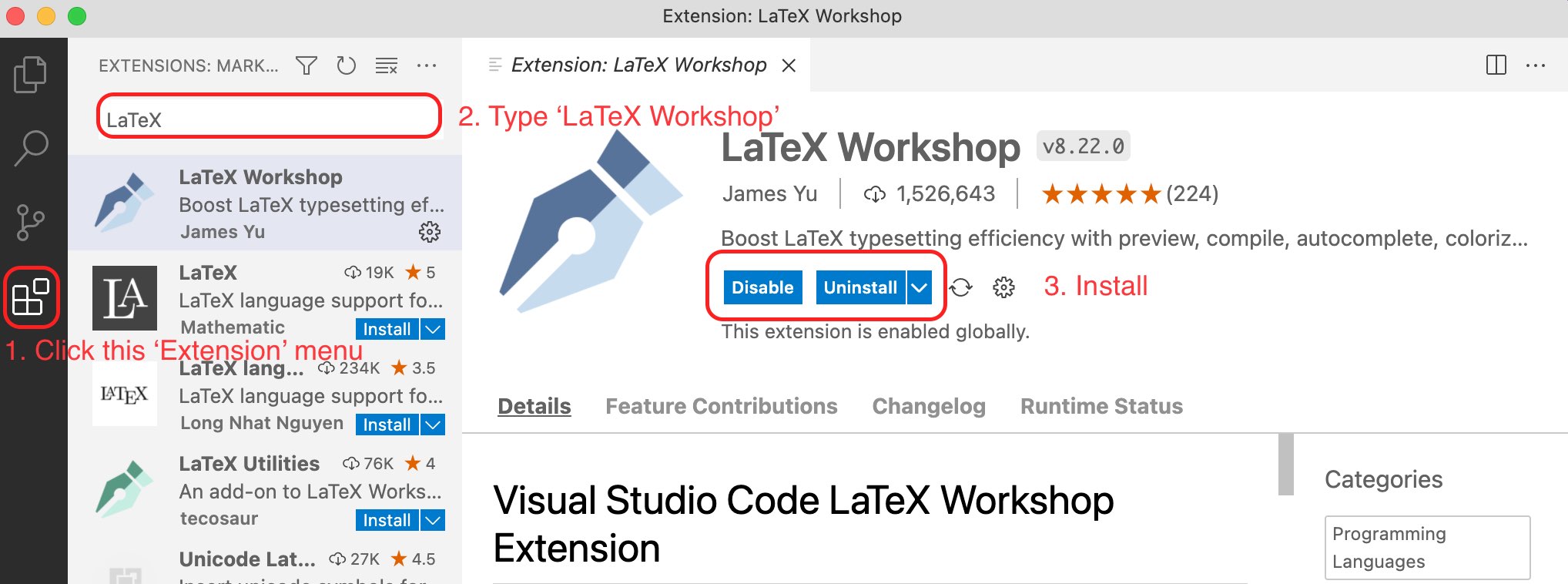 install-extension
After doing that, you may press Shift + Ctrl + P (Windows) or Shift + cmd + P (macOS) to show all commands. Then type Open Settings JSON and open the first item (as shown below).
 open-json
Now copy and paste the following to your json file (inside the brackets {}).
1 | "latex-workshop.latex.tools": [ |
1 | "latex-workshop.latex.recipes": [ |
Step 4. Write & Compile
Now you may open a tex file or create a new one. If you want to compile the file, press Ctrl + Alt + B (Windows) or option + cmd + B (macOS). Moreover, you may choose another recipes from the sidebar. There is button in the right top corner to preview PDF file.
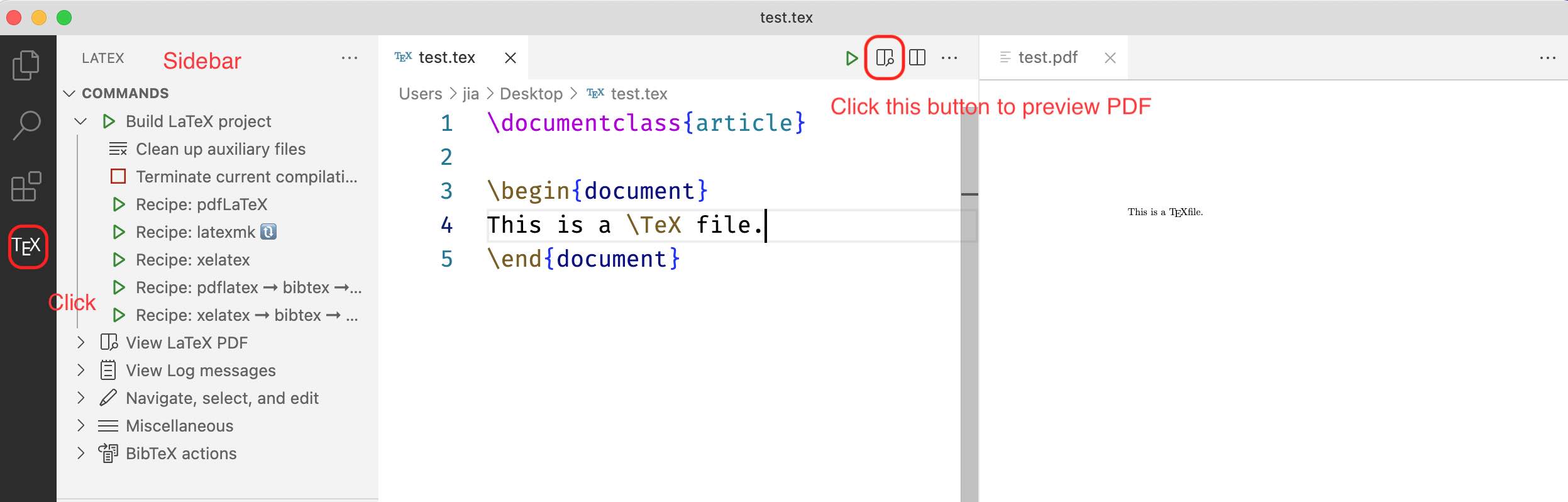
Step 5. 配置是每次编译后,会将中间生成的临时文件删除掉,以保持项目文件夹的整洁。
1 | "latex-workshop.latex.autoClean.run": "onBuilt", |
但是!这里会删除掉一个重要的文件,叫xxx.synctex.gz。这个文件负责的就是刚才说的正反向搜索的锚点。如果删除掉它,那么整个正反向搜索的功能就失效了。
想要不删除它,也很简单,只要注释掉上面的配置文件中的.gz就可以了。
Step 5. 使用:
现在同学们可以通过下载模版等方式(大佬也可以自己写模版)快乐的写LaTeX啦。
编译快捷键:Command+Option+B
显示快捷键:Command+Option+V
正向搜索:选中代码Command+Option+J
反向搜索:shift+command点击预览PDF
Reference:
1、 LaTeX-Workshop Wiki
2、https://mathjiajia.github.io/vscode-and-latex/#step-1-download--install-tex-live
https://feimo.blog.csdn.net/article/details/108997742
https://zhuanlan.zhihu.com/p/38178015
https://zhuanlan.zhihu.com/p/107393437?utm_source=wechat_session
https://blog.51cto.com/shijianfeng/2916199
Wookai/paper-tips-and-tricks
macOS下用sublime写LaTeX并配置自动补全功能
Mac OS 配置 LaTeX 环境
macOS + Sublime Text + Latex 环境配置
Chinese|overleaf
CTEX 宏集手册